XRIO Summer Research Internship
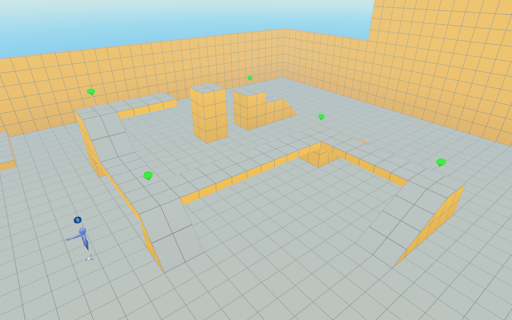
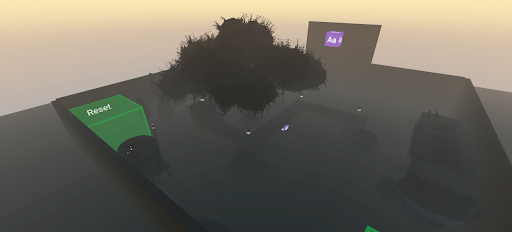
The above illustrates Before: Initial Game Implementation The initial version of the game consisted of a basic obstacle course world with limited interactivity. Core mechanics included simple collision detection between the player and objects, a basic scoring system for collecting gems, and a game manager that controlled the main game states such as start, play, end, and reset. The game supported multiplayer interaction, where all players contributed toward a shared goal, and used dynamic text to display scores and basic updates. While functional, the game environment was minimal and focused primarily on mechanical correctness rather than atmosphere or immersion. After: Expanded and Immersive Game Experience In the updated version, the game evolved into a fully themed haunted obstacle course designed to create a cohesive and immersive player experience. I implemented Gizmos to animate and control game objects, added sound effects to enhance the atmosphere and provide feedback when gems were collected, and used skybox Gizmos to establish a nighttime setting. I imported custom asset libraries— including flooring, walls, and decorative props—to enrich the environment and support the spooky theme. Interactive objects were added throughout the world to encourage exploration and engagement, reinforcing the idea that small design details significantly impact immersion and player experience.
This project explored how immersive virtual reality (VR) environments can be used as effective educational tools by transforming traditional learning experiences into interactive, game-based systems. Working with XRIO and Kapiʻolani Community College, I designed and built a series of VR worlds using Meta Horizon Worlds that incorporated puzzles, challenges, reward systems, and progression mechanics to support learning objectives. The project drew on research in game- based on learning and gamification, focusing on how elements such as feedback loops, scoring systems, collaboration, and adaptive challenges can increase student engagement and retention. The result was a set of playable VR environments that demonstrated how educational content can be embedded into interactive gameplay rather than delivered through static textbooks or lectures.
My role in this project involved both technical development and design iteration. I was responsible for building custom worlds from scratch in Meta Horizon Worlds, writing and modifying TypeScript-based scripts to control gameplay logic, player interactions, scoring systems, object behavior, and event triggers. I developed multiple tutorial-based environments, beginning with foundational mechanics such as movement, collision detection, and object interaction, and progressing toward more complex features including rotating puzzle objects, dynamic UI feedback, cross-platform considerations, camera and HUD adaptations, and custom interaction scripts (such as color-changing and number-revealing mechanics). I also designed the layout, flow, and visual structure of each world, incorporating audio, lighting, and environmental props to enhance immersion. Throughout the project, I iteratively tested and refined each world based on player experience and usability.
Through this experience, I gained hands-on skills in VR development, scripting, and interactive system design, as well as a deeper understanding of how game mechanics can support learning outcomes. I learned how to break down complex systems into modular components, design logic-driven interactions, and debug behavior in a real-time 3D environment. Beyond technical skills, the project strengthened my ability to think critically about user experience, accessibility, and engagement in educational technology. It also reinforced the importance of iterative design, experimentation, and reflection when building interactive systems. Overall, this project helped me connect computer science concepts with real-world applications in education, and it shaped my interest in using immersive technology to create meaningful, learner-centered digital experiences.
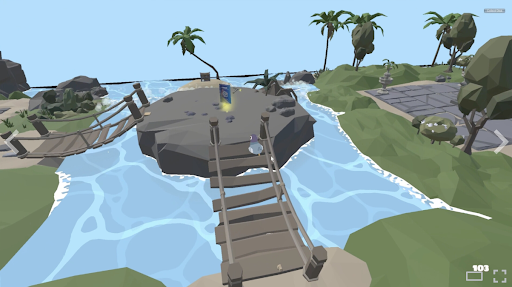
Additional Note: I got the privilege of being involved in reviewing “3D Skills Start Here”, an educational XRIO game designed to teach foundational Blender skills through interactive, quest- based gameplay. I evaluated how effectively the game communicated learning objectives, guided player progression, and supported hands-on skill development. I provided structured game review and design feedback to improve the game’s effectiveness as a learning tool. I created a clear pros-and-cons analysis that identified issues such as unclear progression, exploitable mechanics, bugs, and inconsistent guidance, and paired each issue with concrete suggestions like clearer objectives, stronger feedback cues, and accessibility improvements. I also evaluated mechanics, environment design, and reward systems, highlighting strengths such as visual storytelling and intuitive interactions while helping developers see where targeted changes could improve player understanding, engagement, and skill development. Their Game released that summer on Steam!
Here is some code…. This project was my first time coding in TypeScript, and it served as an introduction to building interactive components in Horizon Worlds. I created a simple custom component called ColorChanger that responds when a player enters a trigger by changing a model’s color and playing a sound. The goal was to experiment with how visual and audio feedback could make interactions feel more engaging. Through this process, I learned the basics of working with entities, triggers, and audio Gizmos, as well as how TypeScript helps organize code and make interactions easier to understand, even at a beginner level.
import { Entity, AudioGizmo } from 'horizon/core';
import * as hz from 'horizon/core';

// This component changes the color of a model when a player enters a trigger
// and plays a corresponding sound for each color change
class ColorChanger extends hz.Component<typeof ColorChanger> {
  static propsDefinition = {
    model: { type: hz.PropTypes.Entity },   // The model entity to change color
    trigger: { type: hz.PropTypes.Entity }, // The trigger entity to detect player entry
    sound_1: { type: hz.PropTypes.Entity },
    sound_2: { type: hz.PropTypes.Entity },
    sound_3: { type: hz.PropTypes.Entity },
    sound_4: { type: hz.PropTypes.Entity },
    sound_5: { type: hz.PropTypes.Entity },
    sound_6: { type: hz.PropTypes.Entity },
    sound_7: { type: hz.PropTypes.Entity }, // Array of sound entities
  };

  // Index to keep track of the current color
  private currentColorIndex = 0;
  private soundArray!: Entity[];

  // Array of natural-looking colors (pastel/soft tones)
  private colors = [
    new hz.Color(0.9, 0.6, 0.6),  // Soft Pink
    new hz.Color(0.6, 0.8, 0.6),  // Soft Green
    new hz.Color(0.6, 0.6, 0.9),  // Soft Blue
    new hz.Color(0.9, 0.9, 0.6),  // Soft Yellow
    new hz.Color(0.8, 0.6, 0.9),  // Lavender
    new hz.Color(0.6, 0.9, 0.9),  // Aqua
    new hz.Color(0.9, 0.75, 0.6), // Peach
  ];

  // Array to store the sound gizmos
  private soundGizmos: hz.AudioGizmo[] = [];
}